Pixel 10 Just Got a Massive Boost with Google Maps Power Saving Mode
Google Maps Power Saving Mode Arrives on Pixel 10 Series Google Maps Power Saving mode is finally rolling out to the Pixel 10 lineup. After a brief tease during the recent Feature Drop, the update is
Google Maps Power Saving Mode Arrives on Pixel 10 Series
Google Maps Power Saving mode is finally rolling out to the Pixel 10 lineup. After a brief tease during the recent Feature Drop, the update is now live and promises a big battery boost during long drives. Google says the mode can add up to four extra hours, which instantly makes it one of the hottest upgrades for frequent travelers.
A New Minimal Layout for Driving
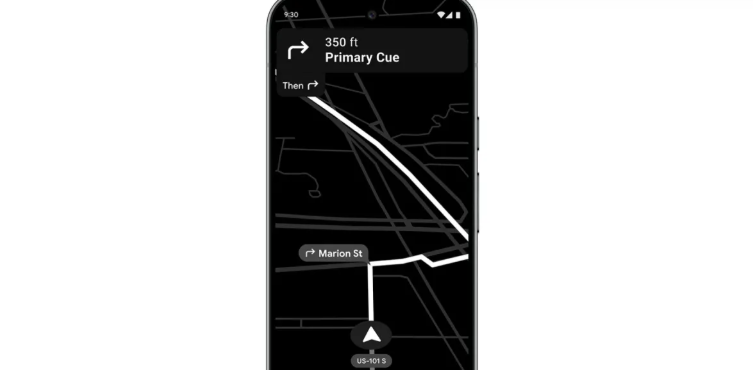
When users start driving navigation on Pixel 10, they can tap the power button to switch into the new Power Saving mode. The screen immediately shifts to a black-and-white interface. It looks simple, yet it keeps the most essential elements active.
The map layer stays visible. The top bar still shows system details and the next turn. However, Google has removed floating action buttons, the Assistant or Gemini shortcut, and even the speed display. The idea is to reduce battery drain while still offering safe, usable guidance.
Quick Controls Still Work Smoothly
Although the interface becomes minimal, Pixel users can still access key controls. Swiping down opens the full notification shade without exiting the mode. Tapping the screen or pressing the power button returns the full-color view instantly. Moreover, the mode turns off automatically when the user reaches the destination.
Works Only in Driving Mode
Google Maps Power Saving mode works only in driving navigation. Cycling and walking navigation do not support it. The feature is also locked to portrait orientation, which helps maintain a consistent low-power layout.
Enabled by Default on All Pixel 10 Models
Google confirmed the rollout covers the Pixel 10, Pixel 10 Pro, Pixel 10 Pro XL, and Pixel 10 Pro Fold. It arrives through a server-side update, so users do not need to install anything manually. The feature is switched on by default, though it can be disabled easily.
To turn it off, users can open Google Maps, tap their profile photo, go to Settings, select Navigation, and toggle the Power Saving mode under Driving options.
A Small Change With Big Battery Gains
Google notes that power savings depend on display settings, traffic conditions, and other factors. Yet the promised boost suggests this mode might become a favourite for highway travelers and rideshare drivers. With phones getting brighter and navigation getting heavier, this update lands at the perfect time for the Pixel crowd.

FocusFlow: The Last Timer You'll Need
Master the art of deep work with our analog-inspired digital interface. Zero tracking, 100% focus.
Learn more
Exploring the intersection of human psychology and digital culture. Documenting the shift toward slow media and helping readers find balance in an attention-based economy.
View all articles