How to Use Samsung Internet on PC: Sync, Browse, and Go Smart
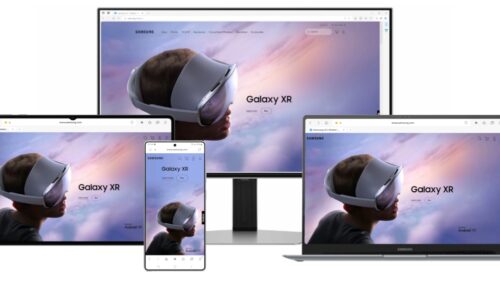
Samsung Internet on PC Samsung has finally brought its popular mobile browser to desktop. The new Samsung Internet for PC beta lets you browse, sync, and explore the web with the same simplicity you e
Samsung Internet on PC
Samsung has finally brought its popular mobile browser to desktop. The new Samsung Internet for PC beta lets you browse, sync, and explore the web with the same simplicity you enjoy on your Galaxy phone. Here’s how it works and what makes it special.
Sync Seamlessly Across Devices
Samsung Internet for PC bridges the gap between your phone and computer. Once logged in with your Samsung Account, your bookmarks, browsing history, and saved passwords sync instantly.
You can start reading something on your phone and continue right from where you left off on your PC. The browser also connects with Samsung Pass, allowing quick autofill and secure logins across both devices.
This seamless connection ensures your browsing stays smooth, no matter which device you pick up.
Explore Smarter With Galaxy AI
The PC version isn’t just about syncing — it’s about getting smarter. Samsung Internet now uses Galaxy AI to make browsing more intelligent and efficient.
When you visit a webpage, Browsing Assist can summarize or translate it instantly. This helps you find information faster and understand it better, even when switching between languages or regions.
AI tools inside the browser aim to reduce time spent searching while keeping the experience intuitive and helpful.
Stay Private and Secure
Samsung Internet on PC continues the company’s strong focus on privacy and security. The browser includes smart anti-tracking, which blocks third-party trackers from collecting your data.
A built-in Privacy Dashboard gives you full control over what’s being tracked, showing you real-time protection status. Samsung says this is part of its commitment to keeping user data private while delivering intelligent services.
Getting Started: How to Download Samsung Internet for PC
The beta version is now available for Windows 11 and Windows 10 (version 1809 and above).
To get started:
- Visit browser.samsung.com/beta.
- Sign in with your Samsung Account.
- Download and install the beta version on your PC.
- Sync it with your phone to enjoy a connected browsing experience.
The beta is currently open in the United States and Korea, with plans for more regions soon.
The Start of a Smarter Browsing Era
With Samsung Internet now expanding to PC, the company is taking a major step toward its ambient AI vision — where devices understand user needs proactively.
This move brings the Galaxy ecosystem closer together, making browsing feel natural, connected, and intelligent. Whether you’re working on your laptop or reading on your phone, Samsung Internet ensures your web world follows you everywhere.

FocusFlow: The Last Timer You'll Need
Master the art of deep work with our analog-inspired digital interface. Zero tracking, 100% focus.
Learn more
Exploring the intersection of human psychology and digital culture. Documenting the shift toward slow media and helping readers find balance in an attention-based economy.
View all articles